
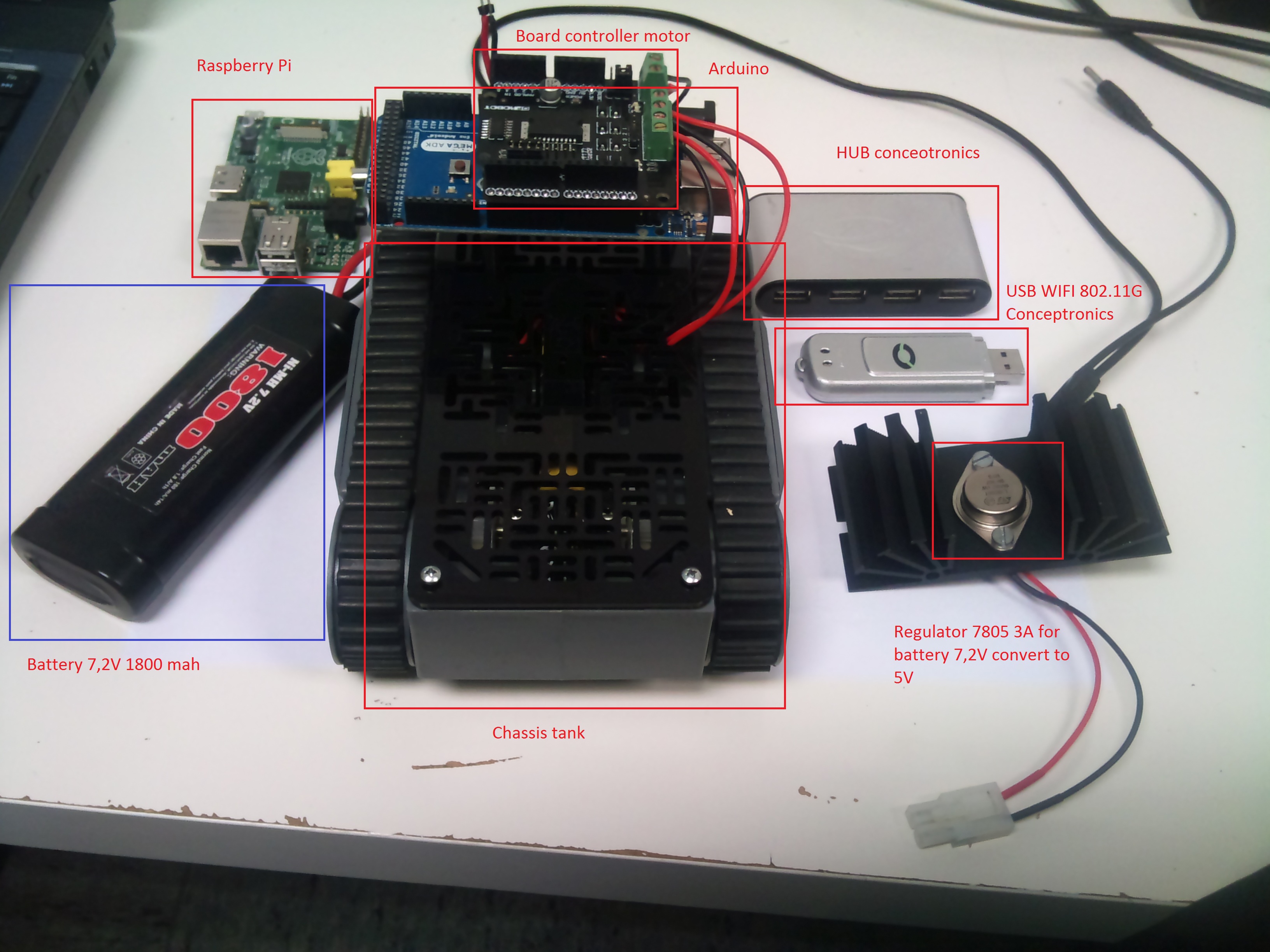
Hello, thanks to Ricardo Hernández, Oscar Canencia from AETEL and the Semana de la Ciencia robotics workshop in the E.U.I.T.Telecomunicaciones UPM, we manage to build a radio controlled car with webcam, driven with a PC via Wi-Fi. You will find an example in the next picture:
The code used to control the car from the PC (created with Python) goes like this:
#!/usr/bin/env python # -*- coding: utf-8 -*- #script inicial #creacion: 01-11-12 #ultima modificacion: 03-11-12 #version:0.0.6 # File:client.py import pygame from pygame.locals import * import socket # Import socket module s = socket.socket(socket.AF_INET, socket.SOCK_STREAM) # Create a socket object host = '192.168.2.1' #socket.gethostname() # Get local machine name port = 5556 # Reserve a port for your service. print 'Connecting to ', host, port s.connect((host, port)) def sendcommand(tecla): byte1 = chr(tecla) #byte2 = chr(camera*8+laser_set*4+int(infrared_set)*2+int(light_set)) s.send(byte1) opcion='y' import msvcrt print "press 'escape' to quit..." while 1: char = msvcrt.getch() if char == chr(27): break print char, if char == chr(97): print "pulsó a" sendcommand(97) elif char == chr(119): print "pulsó w" sendcommand(119) elif char == chr(115): print "pulsó s" sendcommand(115) elif char == chr(100): print "pulsó d" sendcommand(100) elif char == chr(112): print "pulsó d" sendcommand(112) elif char == chr(113): #cerrar la conexion y salir print "Goodbye" import sys sys.exit(0)Execute 2 ssh sessions, for control and video.
Command to load the server to control the vehicle:
sudo./server2.pyCódigo de server2:
#!/usr/bin/python import socket # Import socket module s = socket.socket() # Create a socket object host = '' # Get local machine name port = 5556 # Reserve a port for your service. import serial DEVICE = '/dev/ttyACM0' # the arduino serial interface (use dmesg when connectin$ BAUD = 9600 ser = serial.Serial(DEVICE, BAUD,timeout=1) print 'Server started!' print 'Waiting for clients...' s.bind((host, port)) # Bind to the port s.listen(5) # Now wait for client connection. c, addr = s.accept() # Establish connection with client. print 'Got connection from', addr while True: msg = c.recv(1) # get 2 bytes from the TCP connection print 'Got connection from', msg ser.write(msg) # write the 2 bytes to the serial interface #mesg = ser.read() #print 'respuesta', mesgCommand to load the video streaming server to get the vehicle view:
gst-launch -v v4l2src ! ffmpegcolorspace ! video/x-raw-yuv,width=320,height=240,framerate=(fraction)30/1 ! queue ! videorate ! video/x-raw-yuv,framerate=20/1 ! jpegenc ! multipartmux ! tcpserversink host=192.168.2.1 port=5000 sync=falseConfiguracion el /etc/network/interfaces para configurar la configuracion wifi wlan0:
auto lo iface lo inet loopback iface eth0 inet static address 192.168.1.100 netmask 255.255.255.0 gateway 192.168.1.1 auto wlan0 iface wlan0 inet static address 192.168.2.1 netmask 255.255.255.0 gateway 192.168.2.2 wireless-channel 5 wireless-essid MYNETWORK wireless-mode ad-hoc iface default inet dhcpAdjuntamos un video demostración: